 New Tab ist
The best Todoist Chrome extensions
Updated 24 September 2026 · by the New Tab ist team
The Todoist Chrome extensions worth installing in 2026 are: Todoist for Chrome, the official extension for capturing tasks, pages and emails; New Tab ist, to see your Todoist list in every new tab with a focus timer; Momentum, a photo dashboard that can sync Todoist tasks on its paid plan; and Toggl Track, to track the time spent on Todoist tasks. Here is what each one does, what it costs, and which ones work well together.
We looked at extensions that work directly with a Todoist account, and judged them on four things: what they add to Todoist, how much of your real Todoist data they show, what they cost, and what they ask access to. Prices and features are as of September 2026.
1. Todoist for Chrome: best for capturing tasks
The official extension from Doist, free on the Chrome Web Store. It adds a Todoist button to your toolbar: click it to open a compact Todoist, add a task, or save the page you are reading as a task with its link. It also works inside Gmail, so you can turn an email into a task. Doist retired its separate "Todoist for Gmail" extension in June 2026 and folded that feature into this one.
- Best for: getting things into Todoist quickly from anywhere on the web.
- Limits: your list stays hidden until you click the button.
- Price: free.
2. New Tab ist: best for keeping your tasks in view
New Tab ist replaces Chrome's new tab page with the Todoist web app itself, next to a large clock, your shortcuts, a focus timer and optional widgets (daily intention, quick note, focus stats, read later, world clocks, breathing). Because it shows the real Todoist, everything works: projects, filters, labels, sub-tasks and comments.
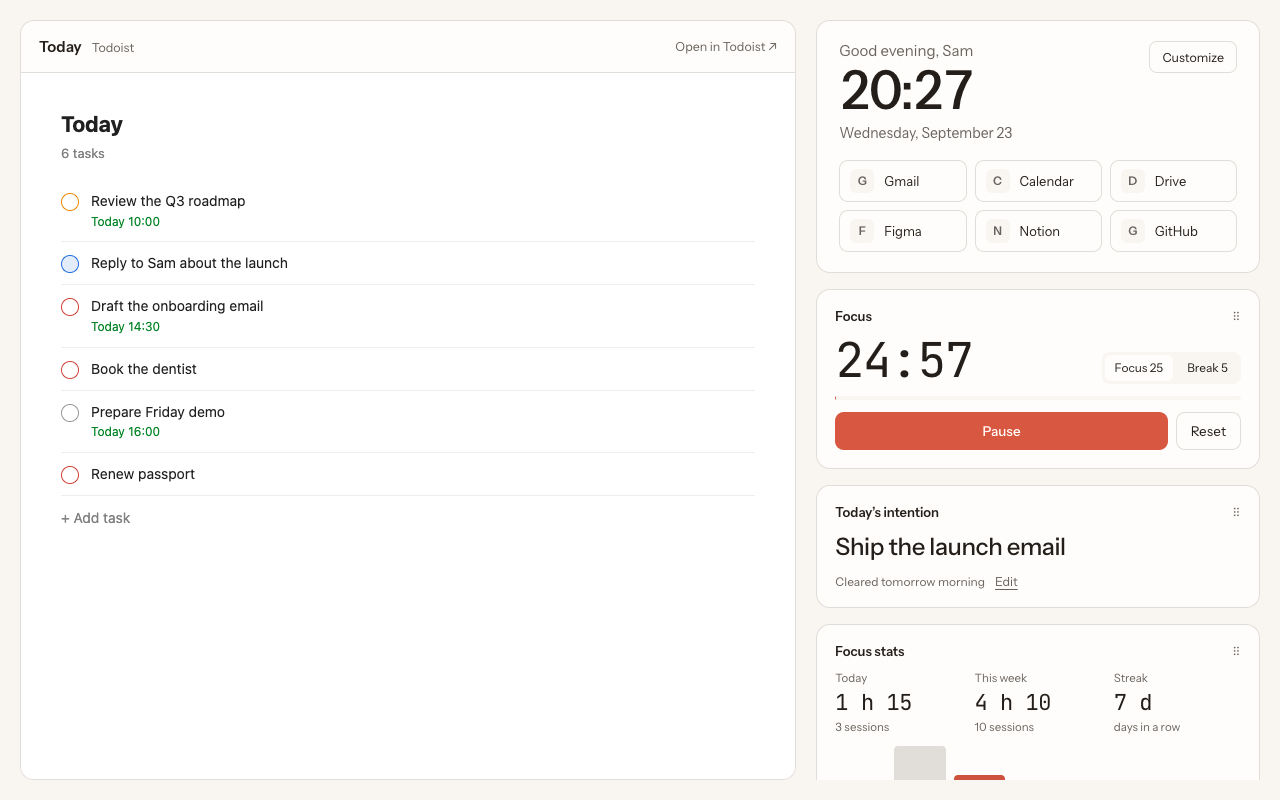
- Best for: people who forget to look at Todoist, and anyone who works in focus sessions.
- Limits: Chrome only; no background photos; no page capture (use the official extension for that).
- Price: €3.99 a month or €39.99 once. Works with free Todoist.
3. Momentum: best for a photo dashboard with many integrations
Momentum is a popular new tab dashboard with a daily background photo, a greeting, a focus of the day and quotes. Its paid plan, Momentum Plus (listed at $39.95 a year), adds a Todoist integration: your Todoist tasks show up in Momentum's own to-do panel, where you can add, complete and reorder them. Plus also connects to other task managers such as Asana, Trello, Microsoft To Do and Google Tasks, and includes a Pomodoro timer.
- Best for: people who want a beautiful dashboard, or who juggle several task managers.
- Limits: the Todoist integration requires Plus; tasks appear in Momentum's panel, not in the full Todoist interface.
- Price: free plan without Todoist; Plus from $39.95 a year.
We compare the two new tab options in detail in Momentum vs New Tab ist.
4. Toggl Track: best for tracking time on tasks
Toggl Track's browser extension adds a timer button to tasks in the Todoist web app. Hover a task, click the button, and Toggl records how long you spend on it. It suits freelancers who bill by the hour, or anyone curious about where their time goes. The extension also has its own Pomodoro mode.
- Best for: time tracking and timesheets.
- Limits: needs a Toggl account; it adds tracking, not a view of your tasks.
- Price: Toggl Track has a free plan and paid plans.
Comparison table
| Todoist for Chrome | New Tab ist | Momentum Plus | Toggl Track | |
|---|---|---|---|---|
| What it adds | Toolbar pop-up, page and email capture | Todoist in every new tab | Photo dashboard with a to-do panel | Time tracking on tasks |
| Shows your full Todoist | Compact view | Yes, the real web app | Tasks in its own panel | No |
| Focus / Pomodoro timer | No | Yes, with stats | Yes | Yes |
| Replaces the new tab | No | Yes | Yes | No |
| Price | Free | €3.99 / month or €39.99 once | $39.95 / year | Free plan, paid plans |
| Made by | Doist | Independent | Momentum | Toggl |
Only one extension can control the new tab page at a time, so choose either New Tab ist or Momentum. The others can all run side by side.
Which ones to combine
- The everyday setup: Todoist for Chrome to capture, New Tab ist to see and work through your list.
- The freelancer setup: add Toggl Track on top, to log time on the tasks you pick from the new tab.
- The multi-tool setup: if your tasks live in Todoist and Asana or Trello, Momentum Plus can gather them in one panel.
Questions
What is the best Todoist extension for Chrome?
For capturing tasks, the official Todoist for Chrome extension. For keeping your list in front of you, a new tab extension such as New Tab ist. Most people get the most out of using both.
Is Todoist for Gmail still available?
Doist retired the standalone Todoist for Gmail extension in June 2026. Its features are now part of the main Todoist for Chrome extension.
Can I use Momentum and New Tab ist at the same time?
No. Chrome lets only one extension control the new tab page. Keep the one you prefer turned on in chrome://extensions.
Are there free Todoist new tab extensions?
Momentum is free, but its Todoist integration requires the paid Plus plan. Without an extension, you can pin a Todoist tab or open Todoist at startup, as described in this guide.
More guides
New Tab ist is an independent extension. It is not made, endorsed or supported by Doist, the company behind Todoist. Todoist is a trademark of Doist, used here only to describe what the extension works with.