 New Tab ist
Todoist for Gmail was retired: what to use instead
Updated 24 September 2026 · by Alex Carter
Doist retired the standalone Todoist for Gmail Chrome extension on June 30, 2026. Turning emails into tasks still works: the official Todoist for Chrome extension now has Gmail support built in, the Todoist add-on for Google Workspace works in Gmail on the web and on phones, and you can forward emails to a Todoist project. Here is how each option works, and how to make sure the email tasks you create actually get done.
What changed
Todoist for Gmail was a separate Chrome extension that added a Todoist button inside Gmail. Doist retired it on June 30, 2026 and moved its Gmail features into the main Todoist for Chrome extension. If you still had the old extension installed, remove it from chrome://extensions and use one of the options below. Your existing tasks are not affected: they live in your Todoist account, not in the extension.
Option 1: Todoist for Chrome (built-in Gmail support)
The official extension works in any Chromium browser. Install it from the Chrome Web Store by searching for "Todoist for Chrome", sign in, then open Gmail: you can add an email as a task, open the email again from the task, and manage your projects without leaving the inbox.
- Best for: people who read email in Gmail on a computer.
- Price: free.
Option 2: the Todoist add-on for Google Workspace
The add-on lives in Gmail's side panel. Install it from the Google Workspace Marketplace, directly from the side panel in Gmail on the web. It works in Gmail on the web, on iPhone and on Android, and lets you set the project, due date, priority, labels and duration before you add the task.
- Best for: people who triage email on their phone, or want to set task details while adding.
- Works with: personal Gmail and Google Workspace accounts.
One limit applies to both options: according to Todoist's help center, the email link saved in the task opens only in Gmail in a web browser, not in the Gmail apps for iOS or Android.
Option 3: forward emails to a project
Each Todoist project has its own email address. Forward an email to it and it becomes a task, with the email body attached as a comment. It works from any email app, not only Gmail, and it is the easiest way to hand an email to teammates in a shared project. Find the address in the project's menu; check Todoist's help center for the plans that include it.
Which one to pick
| Todoist for Chrome | Gmail add-on | Forwarding | |
|---|---|---|---|
| Where it works | Gmail in Chrome and Chromium browsers | Gmail on the web, iOS and Android | Any email app |
| Set project, date, priority while adding | Yes | Yes, plus labels and duration | Afterwards, in Todoist |
| Link back to the email | Yes (opens Gmail on the web) | Yes (opens Gmail on the web) | Email attached as a comment |
| Install | Chrome Web Store | Google Workspace Marketplace | Nothing to install |
Many people use two: Todoist for Chrome at the desk, the add-on on their phone.
Get email tasks done, not just saved
Turning an email into a task is the easy part; the risk is that it disappears into a list you never open. A few habits help:
- Give every email task a date. "Reply to Sam" without a date sinks to the bottom. Today or tomorrow keeps it in your daily plan.
- Start the title with a verb. "Reply", "Send", "Review": you know what to do without opening the email.
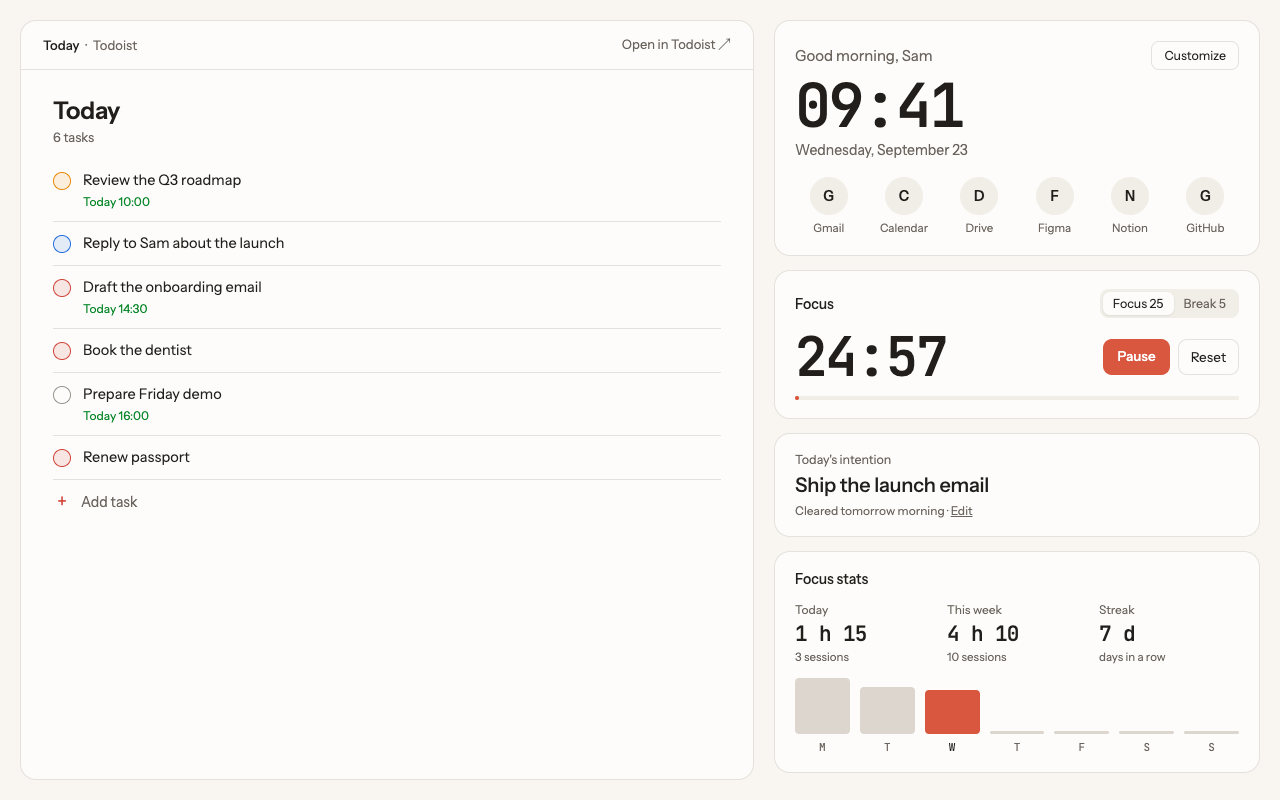
- Keep the list in view. With New Tab ist, your Today list opens in every new Chrome tab, so the email tasks you saved show up the next time you open a tab, and the link takes you straight back to the email.
- Batch replies. Group short replies and clear them in one 25-minute focus session.
Questions
Is Todoist for Gmail discontinued?
The standalone Todoist for Gmail Chrome extension was retired on June 30, 2026. Its Gmail features are now part of the Todoist for Chrome extension, and a Todoist add-on is available for Gmail through the Google Workspace Marketplace.
Do I lose my tasks created from emails?
No. The tasks are stored in your Todoist account. Only the old extension stopped working.
Can I add Gmail emails to Todoist on my phone?
Yes, with the Todoist add-on for Google Workspace, which works in the Gmail apps for iOS and Android.
Does New Tab ist add emails to Todoist?
No. New Tab ist shows your Todoist list in every new tab. Use Todoist for Chrome or the Gmail add-on to capture emails; the tasks then appear in the tab.
More guides
New Tab ist is an independent extension. It is not made, endorsed or supported by Doist, the company behind Todoist. Todoist is a trademark of Doist, used here only to describe what the extension works with.