 New Tab ist
Todoist Chrome extension: the complete guide
Updated 24 September 2026 · by the New Tab ist team
There are two kinds of Todoist Chrome extension. The official Todoist for Chrome extension, made by Doist, adds a toolbar button to capture tasks and save web pages. A Todoist new tab extension, such as New Tab ist, replaces Chrome's new tab page with your task list so you see it every time you open a tab. This guide covers both, plus the options that need no extension at all, so you can pick the setup that fits how you work.
The five ways to use Todoist in Chrome
Todoist runs in any browser at app.todoist.com, so Chrome users have more choices than people often realize:
- The official Todoist for Chrome extension: a pop-up in the toolbar to add tasks, glance at your list and turn the current page into a task.
- A Todoist new tab extension: every new tab opens on your Todoist list, usually with extras such as a clock or a focus timer.
- A pinned tab: Todoist stays open as a small tab on the left of your tab bar.
- An app window: Chrome opens Todoist in its own window, like a desktop app.
- The startup page: Chrome opens Todoist once, when the browser starts.
They are not mutually exclusive. The most productive setups combine a way to capture tasks quickly with a way to see them without thinking about it.
The official Todoist for Chrome extension
Todoist for Chrome is Doist's own extension, free on the Chrome Web Store. Once installed, a Todoist icon sits in your toolbar. Click it and a compact version of Todoist opens in a pop-up, where you can add a task, check one off or browse your projects.
Its best feature is capture from the web. While reading an article or an email, you can add the page to Todoist as a task, with the link attached, so you can come back to it later. That makes it ideal for "read this", "reply to this" or "buy this" tasks.
It also works in Gmail, where it turns an email into a task. Doist retired its separate Todoist for Gmail extension in June 2026 and moved that feature here. For other useful add-ons, see the best Todoist Chrome extensions.
What it does not do is keep your list in front of you. The pop-up closes as soon as you click elsewhere, and you have to remember to open it. If your problem is forgetting to look at Todoist, the toolbar button alone will not solve it.
- Good for: capturing tasks and pages in two clicks, without leaving what you are doing.
- Less good for: planning your day or keeping today's tasks visible.
- Price: free, works with free and paid Todoist accounts.
A Todoist new tab extension
A new tab extension replaces the page Chrome shows when you press Ctrl + T (⌘ + T on a Mac). Instead of a search box and shortcuts to recent sites, you get your Todoist list. Most people open dozens of tabs a day, so your tasks come up dozens of times a day, without any effort.
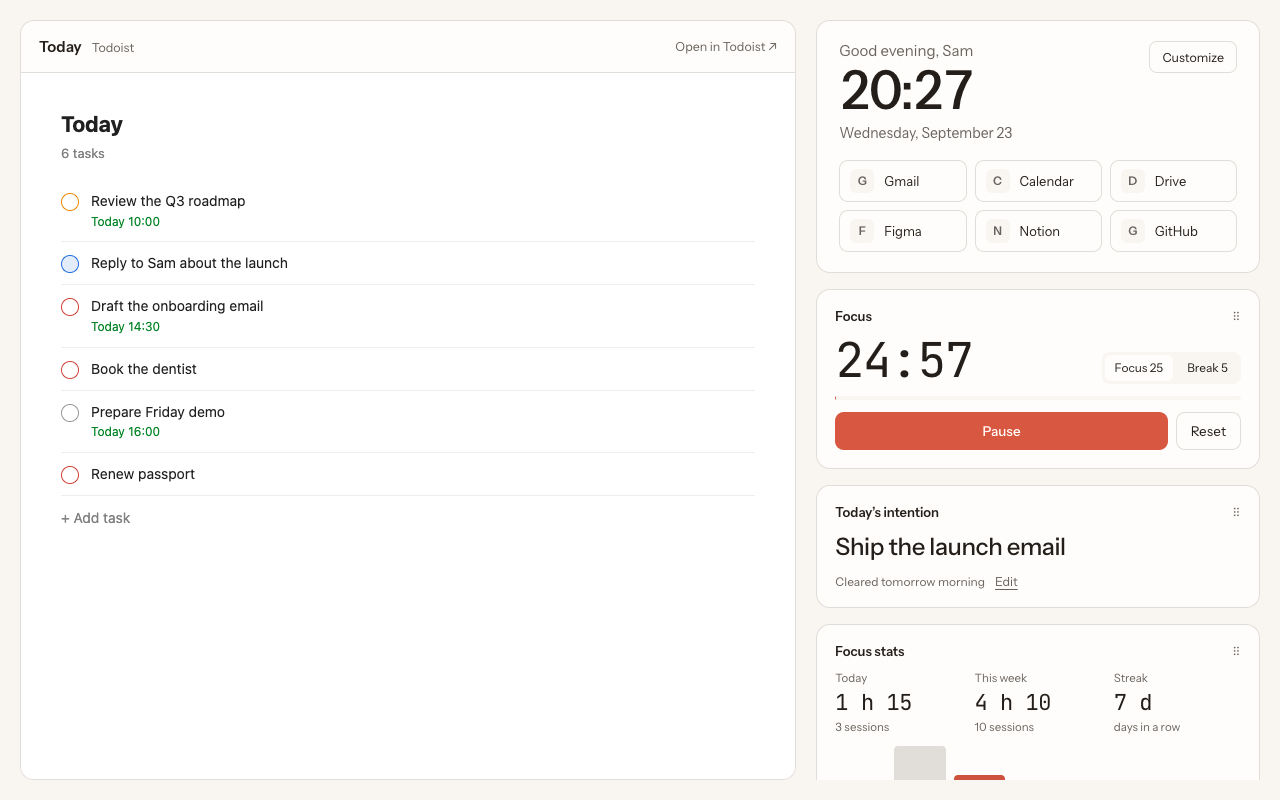
New Tab ist is a Todoist new tab extension built around the real Todoist web app. The list you see is Todoist itself: you check off, add, edit and reorder tasks there, and every change is saved in your Todoist account straight away. Around it, you get a large clock, shortcuts to the sites you use most, a focus timer with daily stats, and widgets you can arrange: a daily intention, a quick note, a read-later list, world clocks and a one-minute breathing break.
- Good for: keeping today's tasks visible all day, and working through them with a focus timer.
- Less good for: saving the page you are reading as a task (keep the official extension for that).
- Price: New Tab ist costs €3.99 a month or €39.99 once, and works with free and paid Todoist accounts.
Options without an extension
Pin a Todoist tab
Open app.todoist.com, right-click its tab and choose Pin. The tab shrinks to an icon on the left of the tab bar and stays there, even after restarting Chrome. It is free and simple, but a pinned tab is easy to ignore, and you still have to click it to see your tasks.
Open Todoist in its own window
With Todoist open, go to Chrome's menu, then Cast, save and share → Create shortcut, and tick Open as window. Todoist gets its own window and an icon in your dock or taskbar. It behaves much like the Todoist desktop app, which is also available for Mac and Windows.
Open Todoist when Chrome starts
In Chrome's Settings → On startup, choose Open a specific page and add https://app.todoist.com. Todoist then opens every time you launch Chrome. Note that Chrome has no setting to show a custom page in every new tab: that is only possible with an extension. The step-by-step guide covers all of these settings.
Side-by-side comparison
| Todoist for Chrome | New Tab ist | Pinned tab | App window | |
|---|---|---|---|---|
| Tasks visible without a click | No | Yes, in every new tab | No | If the window stays open |
| Add a task quickly | Yes | Yes | Yes | Yes |
| Save the current page as a task | Yes | No | No | No |
| Focus timer and stats | No | Yes | No | No |
| Clock, shortcuts, widgets | No | Yes | No | No |
| Made by | Doist | Independent | Chrome feature | Chrome feature |
| Price | Free | €3.99 / month or €39.99 once | Free | Free |
Which one should you pick?
- You mostly need to capture tasks while browsing: install the official Todoist for Chrome extension.
- You forget to look at Todoist, or you want your day's plan in front of you: use a Todoist new tab.
- You like working in timed sessions: a new tab with a built-in Pomodoro timer saves you a separate timer app.
- You want something free and minimal: pin a Todoist tab, or open it in its own window.
The setup we recommend
Install both extensions. They do not overlap: the official Todoist for Chrome button captures tasks from any page, and New Tab ist shows your list every time you open a tab. Capture happens where you are; review happens every time you start something new. It is the closest thing to having Todoist always open without it taking up screen space.
Questions
Is there an official Todoist Chrome extension?
Yes. Todoist for Chrome is made by Doist and is free on the Chrome Web Store. It adds a toolbar pop-up for adding tasks and saving web pages. It does not replace the new tab page.
Can Todoist replace the Chrome new tab page?
Not on its own, and Chrome has no setting to open a custom page in new tabs. You need a new tab extension such as New Tab ist, which shows the Todoist web app in every new tab.
Do these extensions work with the free Todoist plan?
Yes. Both the official extension and New Tab ist work with free and paid Todoist accounts.
Can I use the official extension and New Tab ist together?
Yes. They do different things and do not conflict. Many people use the toolbar button to capture tasks and the new tab to see them.
Does a Todoist new tab extension see my tasks?
New Tab ist shows the regular Todoist web app. You sign in on todoist.com, and the extension never sees your password or copies your tasks. See the privacy policy.
Does it work in Edge, Brave or Arc?
New Tab ist is built for Google Chrome. Chromium-based browsers can usually run Chrome extensions, but only Chrome is officially supported.
More guides
New Tab ist is an independent extension. It is not made, endorsed or supported by Doist, the company behind Todoist. Todoist is a trademark of Doist, used here only to describe what the extension works with.