 New Tab ist
Plan your day with Todoist
Updated 24 September 2026 · by the New Tab ist team
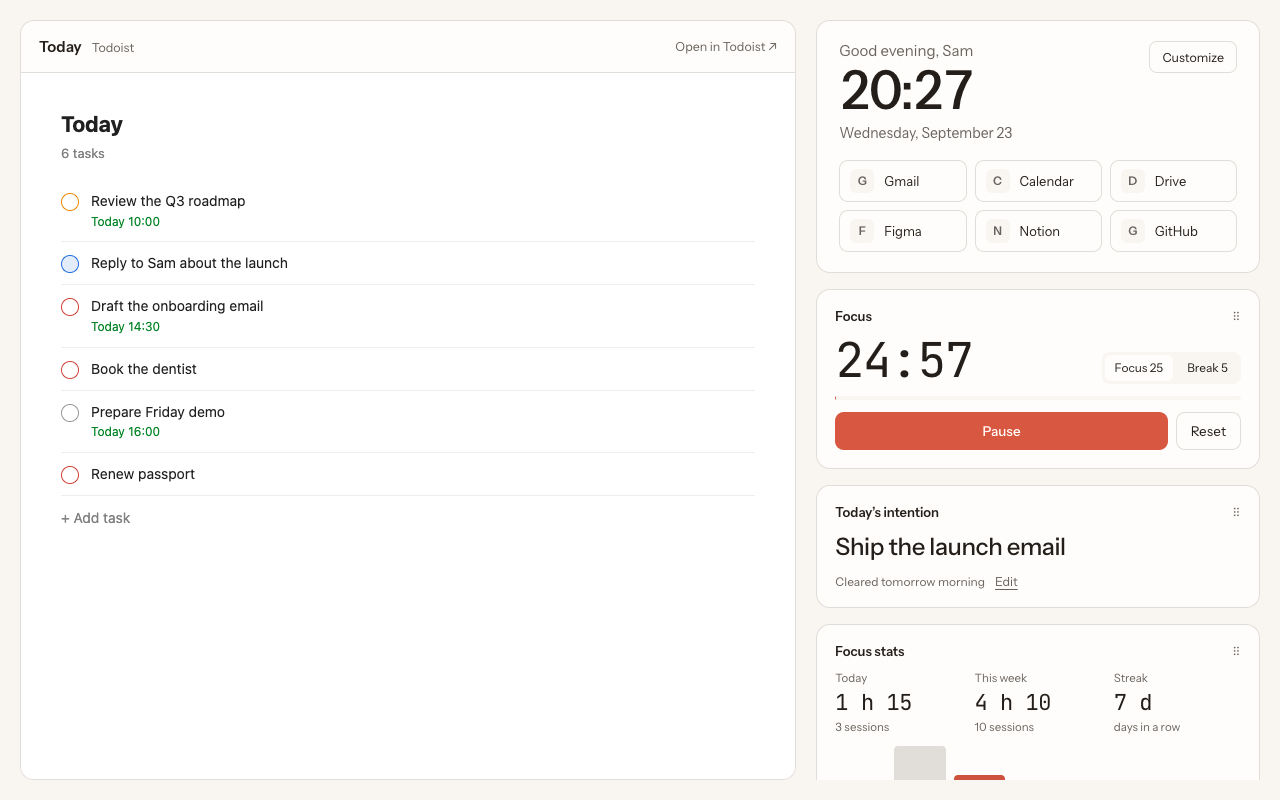
To plan your day with Todoist, spend ten minutes each morning in the Today view: reschedule overdue tasks, keep only what you can really finish, mark the one or two tasks that matter most as priority 1, and write down your intention for the day. Then work through the list in focus sessions, and close the day in five minutes. Here is the routine step by step.
Before you start: one rule
A date in Todoist should mean "I will do this that day", not "it would be nice". If Today holds 25 tasks, you will finish 8 and feel behind. Keep deadlines in the task name or description if you need to, and give a date only to what you commit to.
Morning: 10 minutes
- Open Today. Overdue tasks appear at the top. Use Reschedule to move them in one go, or give each a real new date. Delete what no longer matters.
- Check the Inbox. Give everything captured since yesterday a project and, only if you will do it, a date.
- Trim Today. Add up what you have. If it does not fit in your day, move the rest to tomorrow or later this week. Todoist task durations help here.
- Pick the one or two that matter. Set them to priority 1 (1 on the selected task). They rise to the top.
- Write your intention. One sentence: what would make today a good day? New Tab ist has a Today's intention widget for this; it clears itself the next morning.
During the day: work in sessions
- Start with priority 1. Do the most important task first, before email.
- Use focus sessions. 25 minutes on one task, then a 5-minute break. See the Todoist Pomodoro timer.
- Capture, don't act. New requests go to the Inbox with Q, not straight into your day. You will sort them tomorrow morning.
- Look at the list often. The easiest way is to have it in every new tab, so each time you start something, you see what is next.
Evening: 5 minutes
- Check off what is done, even small things.
- Move what is left to a realistic date instead of letting it go overdue.
- Glance at tomorrow in Upcoming, so the morning starts with no surprises.
Weekly: 20 minutes
Once a week, go through each project and your undated tasks. Decide what to schedule, what to delegate and what to delete. A filter like no date & !#Inbox makes this fast; see how to build a Todoist dashboard for more filters.
Make it stick
Routines fail when they depend on remembering. Put the plan where you cannot miss it: with New Tab ist, every new tab shows your Today list, your intention and the focus timer, so the plan you made in the morning is in front of you all day.
Questions
How many tasks should I put in Today?
As many as you can really finish. For most people that is 3 to 7 meaningful tasks plus a few small ones. If you regularly carry tasks over, you are planning too much.
Should I use priorities or labels for planning?
Use priority 1 for the one or two tasks that must happen today, and labels for context, such as @email or @calls, so you can batch similar work.
What if my plan falls apart by noon?
Re-plan in two minutes: move what will not happen to another day, and pick the next most important task. The plan is a tool, not a contract.
More guides
New Tab ist is an independent extension. It is not made, endorsed or supported by Doist, the company behind Todoist. Todoist is a trademark of Doist, used here only to describe what the extension works with.